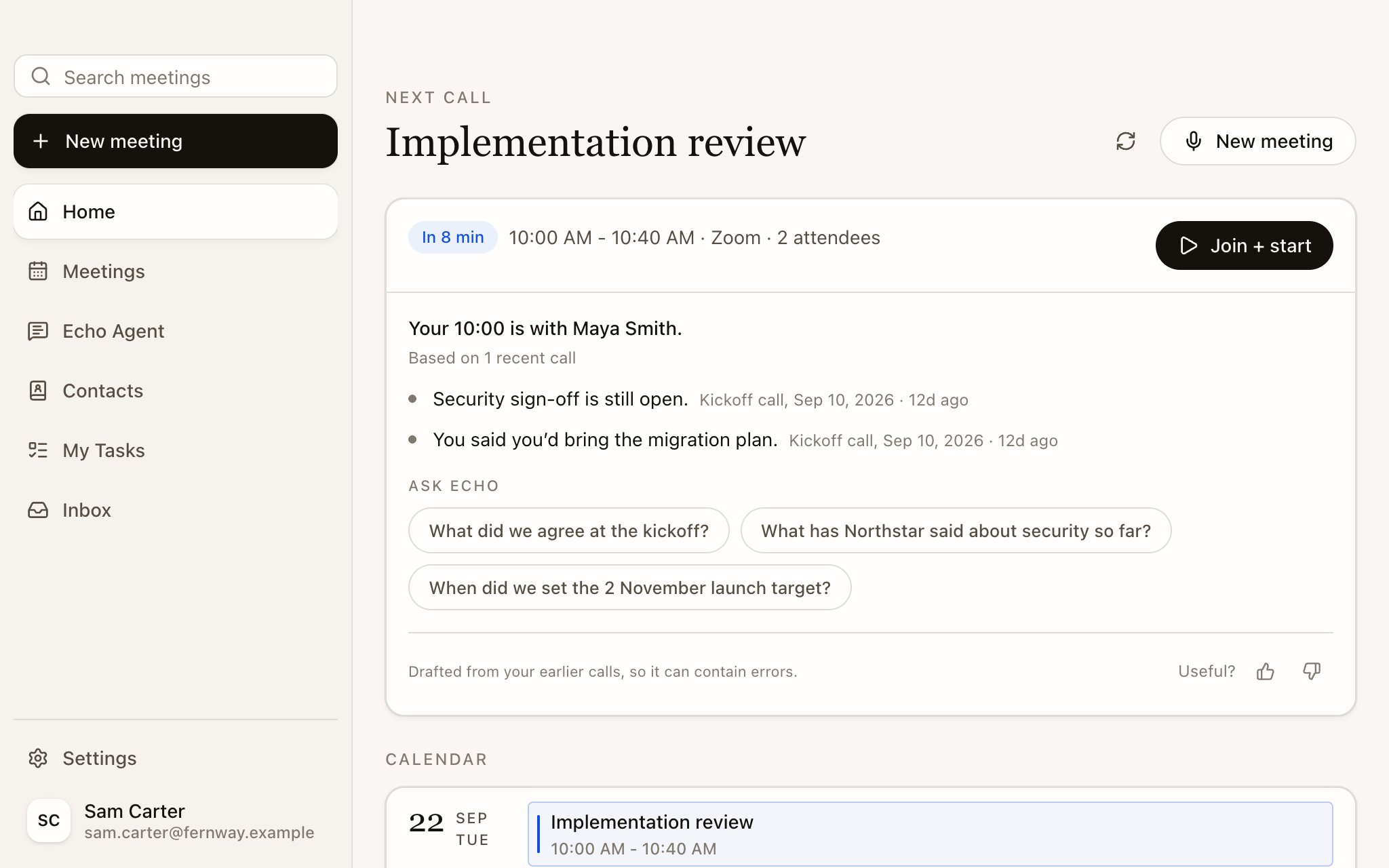
Read what Echo found in your earlier meetings with the same people, ask follow-up questions and draft the questions you want to ask.
Before each calendar meeting, Echo looks for earlier meetings with the same person, the same company or the same recurring series, and writes a short brief from them. Each line links to its source, usually the meeting it came from, with its date and how long ago it was.
When your next meeting has a brief, Home shows it on the upcoming meeting card with the time, a Join + start button and a few Ask Echo suggestions. The screenshot below shows the earlier Next call layout; see Home for the upcoming Suggestions interface.
A brief has at most a few lines. It can say there is nothing useful yet, which is normal for a first meeting with someone. Open items from earlier calls that this meeting’s topic doesn’t cover are labelled Still open from earlier calls.
For a group meeting, matching on people needs at least two attendees from an earlier meeting. One shared colleague isn’t enough, so one client’s history doesn’t leak into another client’s brief. Echo also uses earlier meetings in the same recurring series or with the same client company.
Select the meeting to open its brief page. It has three views.
View
What’s in it
Brief
The brief, Context sources (the earlier meetings it was written from) and an Ask Echo box for follow-up questions such as “What did Maya say about the migration plan?”
Notes
Your own notes for this meeting. They save as you type, and Echo doesn’t send them to AI or to memory on its own
Files
Attachments and screenshots for this meeting
You can also change the Meeting type here before you start. Echo marks the one it suggests with Suggested.
If Questions to ask is on for the Meeting Type, the brief page proposes three to five questions based on what’s still open. Edit them as you like, one per line. Select Generate to draft them again from the latest research. Your edits stay yours when Echo refreshes the research.During the meeting, Echo grades each question against what the other person says: a good answer, a partial answer or a weak one, with a follow-up to ask when an answer falls short. See Turn on live help.
Questions to ask are off in every Meeting Type until you switch them on in Settings › Meeting types.
Every brief ends with Useful? and a thumbs up or down. A thumbs down asks What was wrong? so you can say what missed. Select the same thumb again to take your rating back.
Each Meeting Type has its own brief instructions. Open Settings › Meeting types, choose a type and edit How Echo briefs you. For example: “Lead with open commitments on both sides. Skip small talk.” See Meeting Types.