
Share with someone outside Echo
The External people option is available in desktop 0.1.87. If it is not in your Share dialog yet, update Echo.- Open Share, then choose External people.
- Enter the recipient’s email address. They do not need an Echo account or Organization membership.
- Keep Notes selected, and optionally include Transcript or Recording.
- Select Preview as recipient to review the content they will see.
- Select Send invitation, or Create and copy link to send the restricted link yourself.
Share
- Open the meeting and select Share.
- In Add a person or team…, type a name and pick a person or a team, or choose Everyone at followed by your Organization’s name.
- Choose an Access level, then select Share.
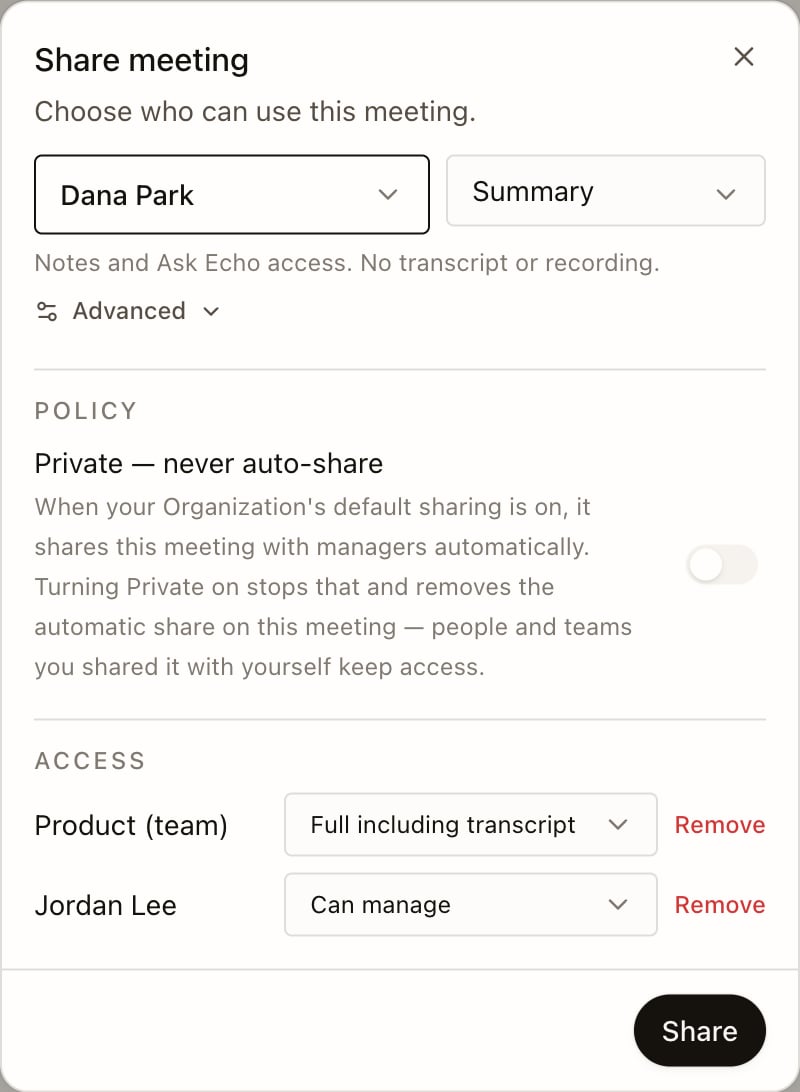
Open Advanced to choose individual rights: Notes, Transcript, Memory recall, Recording, Export and Manage sharing. The level then shows as Custom.
Memory recall lets Echo Agent use facts from your meeting when the people you shared it with ask it questions.
To change or remove someone’s access, open Share again and edit their row.